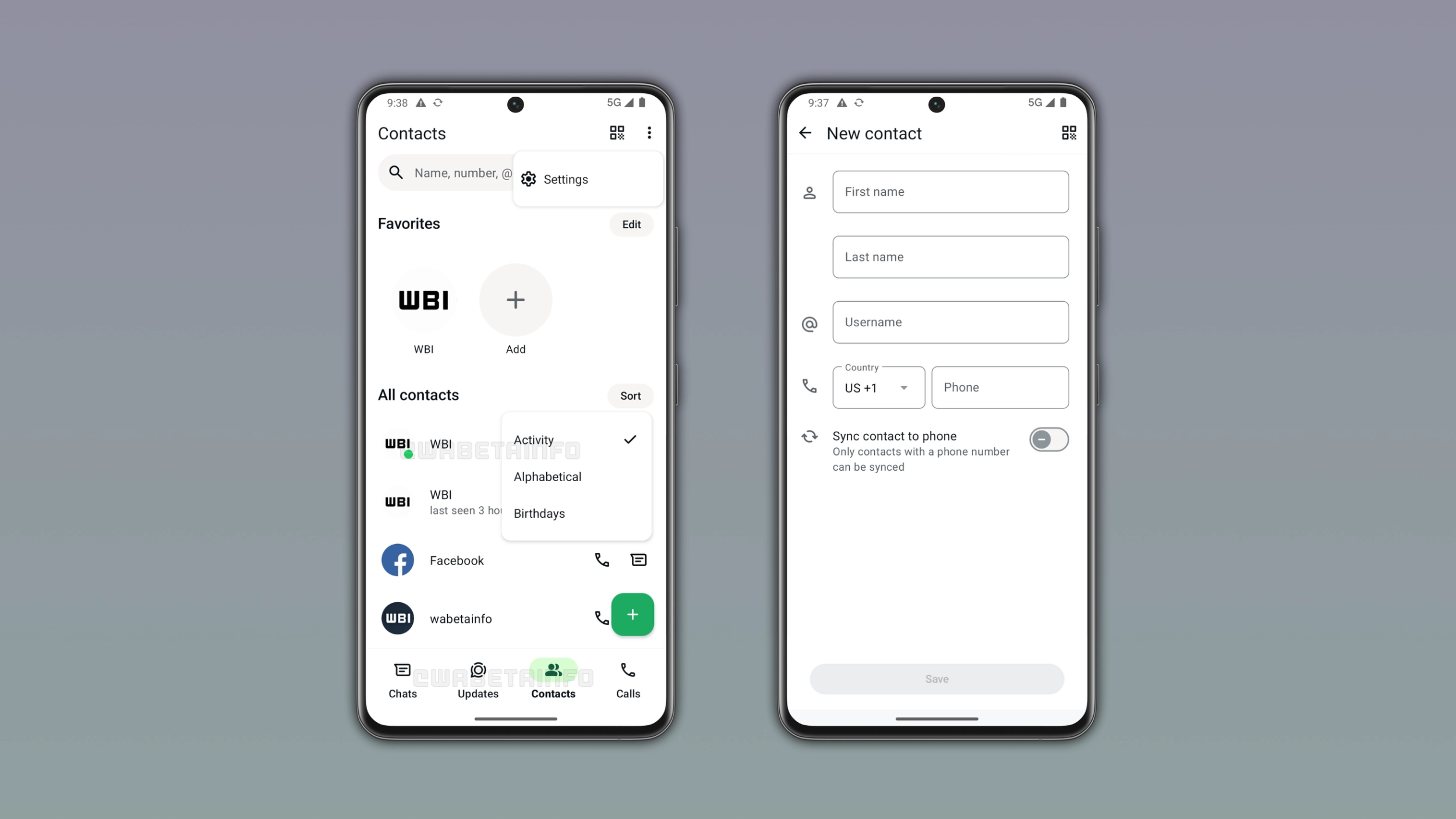
WhatsApp is finally introducing a new tab to see online contacts from the bottom navigation bar on Android. The new tab allows users to manage their contacts, sort them, and start a new conversation. WhatsApp is replacing the Communities tab with the new Contacts tab in this initial phase.
Enter your email address to subscribe to this blog and receive notifications of new posts by email.
In the post about the WhatsApp beta for Android 2.26.40.3 update, we announced a dedicated tab for contacts. With this feature, WhatsApp is developing a tab where users can see their contacts and when they're online. The tab includes a Favorites section, a full contact list, and some options to sort the list. By introducing this tab, WhatsApp also wanted to make it faster for users to search for recently active contacts without scrolling the chat list.
WhatsApp is bringing the Contacts tab to the bottom navigation bar on Android. The tab replaces Communities to give users quick access to their contact list. We discovered this with the WhatsApp beta for Android 2.26.45.2 update, which is available on the Google Play Store. With this update, WhatsApp is rolling out a new Contacts tab to some beta testers. Users can see their contacts in the new tab organized in a familiar layout.
At the top of the Contacts tab, WhatsApp shows contacts users marked as their favorites. This section allows users to see and manage their pinned contacts to start a conversation with them faster.
Source link