Curb unwanted Google Ads spending without losing valuable conversions by weighing bidding targets, Performance Max channel grouping, and allocation limits.
Google Ads’ new Channel Prioritization and Budget Allocation controls give PPC managers more input into decisions they’ve been leaving to automation. Advertisers can choose which eligible channels receive budget first and limit spending on lower-priority inventory.
The announcement gives advertisers more options, but choosing a setting still requires a reason to intervene. A campaign meeting its CPA or ROAS target may be spending in ways the business wants to change. Restricting that spending could address the concern, although it could also reduce conversions the advertiser would want to keep.
Before applying the new controls, PPC managers need to know what each setting can change and how they’ll judge the result. A shift in channel spending alone won’t establish that the account is performing better, especially if total conversion volume falls with it.
This article examines where advertisers gain control and how to decide whether an account needs an adjustment. Performance Max is worth digging into first because the channel breakdown advertisers can see in reporting goes further than the individual priorities these settings let them assign.
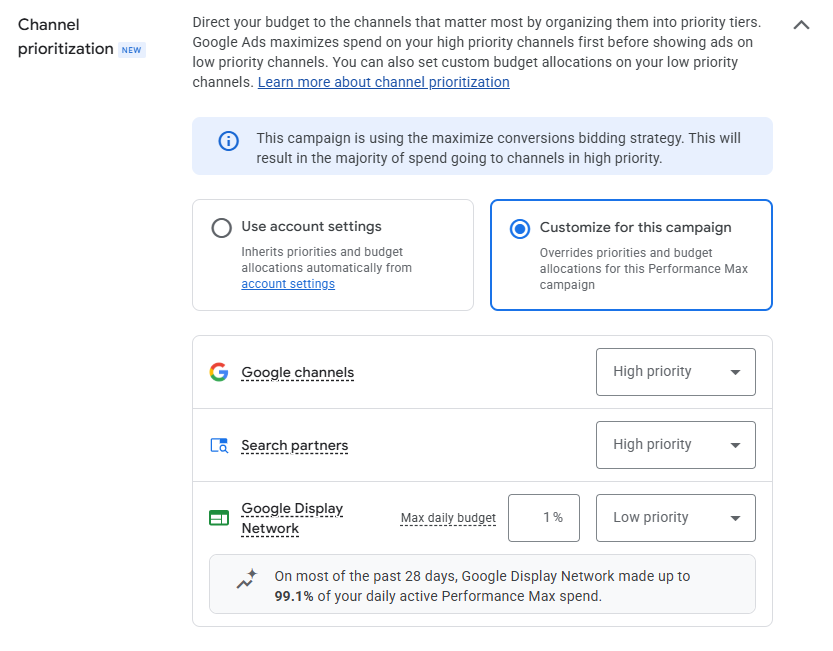
Google groups Search, YouTube, Discover, Gmail, and Maps together as “Google channels” under the new prioritization settings. Advertisers can prioritize that group separately from Search Partners and the Google Display Network, but they can’t assign different priorities within it.
If you’re a PPC manager reviewing Performance Max channel results, this limits the changes you can make directly.
Source link