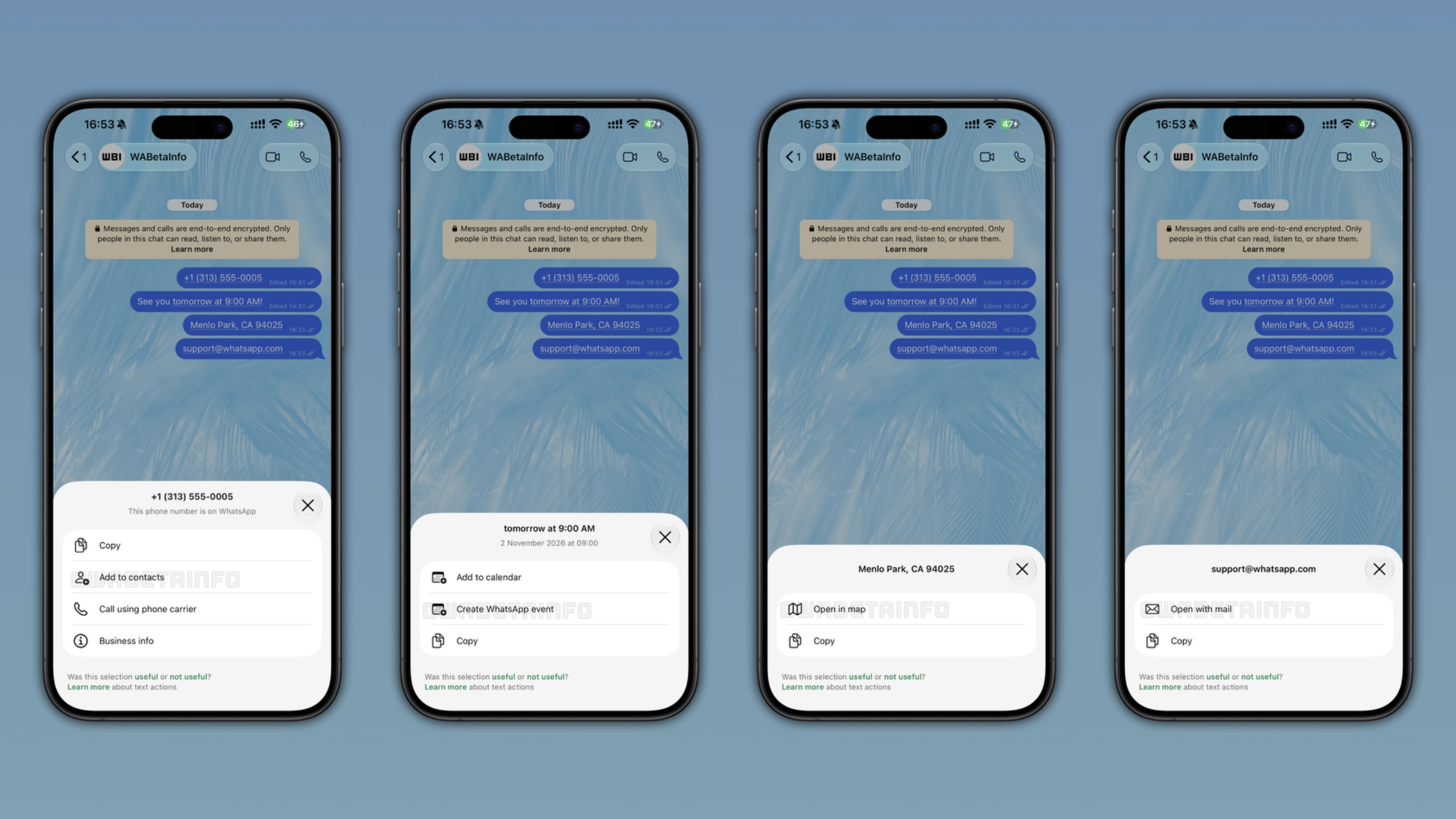
WhatsApp now detects phone numbers, dates, addresses, and email addresses in messages to suggest quick shortcuts automatically. When the app recognizes one of these formats, it marks the text with a dotted underline so users know that an action is available. Users can tap it to see what they can do or leave it to continue the conversation.
Enter your email address to subscribe to this blog and receive notifications of new posts by email.
This new weekly roundup brings together all the latest updates about WhatsApp beta shared this week. As a result, you can finally catch up on everything you might have missed from our past announcements. You can consider this summary as a way to keep up new features, improvements, and fixes. This week's highlight focuses on message actions, a new feature that offers some shortcuts when the app detects specific message formats. See what else we announced this week.
WhatsApp is working on a contextual chat preview that appears when users long press on a conversation. The preview shows the most recent messages in the chat, so users can read them without opening the conversation. The new chat preview feature will let users read new messages without marking them as read. This means that WhatsApp will update read receipts only when users open the chat normally. In the future, WhatsApp will also introduce a scrollable preview to let users scroll through the conversation interface without opening it.
WhatsApp is rolling out smart message text actions on the latest versions of WhatsApp for Android and iOS .
Source link