Facebook settings can control specific notification types, including comments, tags, birthdays, groups, and Pages.
Phone settings can block Facebook alerts at the system level on iPhone and Android devices.
Email, SMS, push, and browser alerts may require separate controls for complete notification management.
Facebook notifications can fill a phone with alerts about comments, friend requests, tags, birthdays, groups, Pages, and other activity. A full shutdown does not require changing Facebook account settings. The Facebook app has its own notification controls, while iPhone and Android also have separate controls for app alerts. The right method depends on the type of alert that needs to stop.
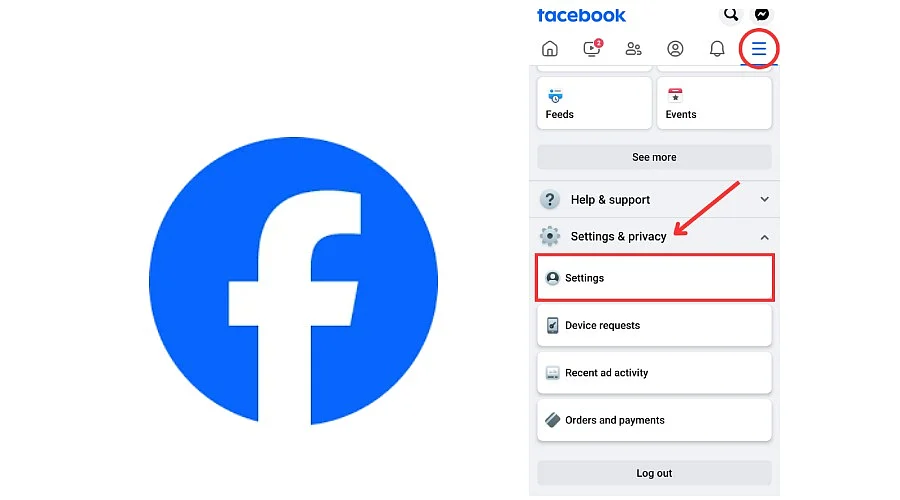
The Facebook app keeps notification controls inside the main settings area. Open Facebook, tap the Menu or profile icon, select Settings & privacy, then choose Settings. Find Notifications under the Preferences area and open that section. Facebook then shows several notification categories, along with delivery choices for different alert types. Current Facebook layouts can vary by device, account, and app version.
The Notifications section gives control over specific types of activity. Comments, tags, friend requests, birthdays, groups, Pages, events, and other Facebook activity can have separate controls. Open a category, then turn off the alert type that no longer needs attention. This approach keeps useful alerts active while removing unwanted ones.
Push notifications create alerts on a phone even when the Facebook app stays closed. Facebook offers a Push section within its notification settings on many current app versions. Open Settings & privacy, select Settings, choose Notifications, then open Push.
Source link