Did a fresh Linux install? You're not done yet. Whether you're new to Linux or a seasoned user, there are certain things you should do to configure your new Linux system. As a long-time Linux user myself, these are the 12 things I always do on my new Linux system to get a head start.
After installing a Linux distribution, the software and other necessary packages inside it might not be in their latest versions. Updates are essential to keep your system secure and running smoothly. It also makes sure your software stays compatible with the Linux system. Thankfully, updating your Linux system is simple. You can typically search your application launcher for a software store that includes an update tab. Most popular Linux distributions come with one (if not a dedicated update tool), so you don't have to worry.
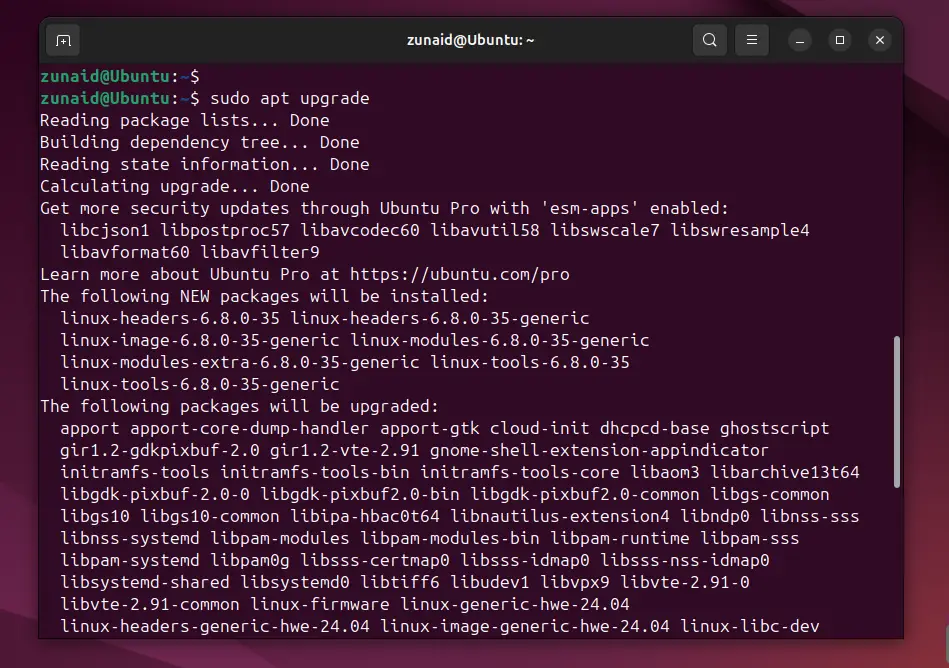
If you enjoy using a terminal, you can update with a couple of quick commands. Open the terminal by hitting Ctrl+Alt+T. If you want to update Debian, Ubuntu, or any of their derivatives, run:
This command refreshes the software repositories to update the package information. This allows you to verify if there are new versions of software available. However, the command doesn't automatically install them. To install those updates, you need to run:
This will download and install any updates of installed software and system packages. Updating your Linux system is more or less the same on different Linux versions, except, different distros may use different package managers.
Source link