CONNECT WITH US
Tech

Tech

Now Firefox can select which sites use its VPN, and clear your browsing history with one click

TheVerge - Tech logo

Published on

Add as a preferred source on Google
Now Firefox can select which sites use its VPN, and clear your browsing history with one click

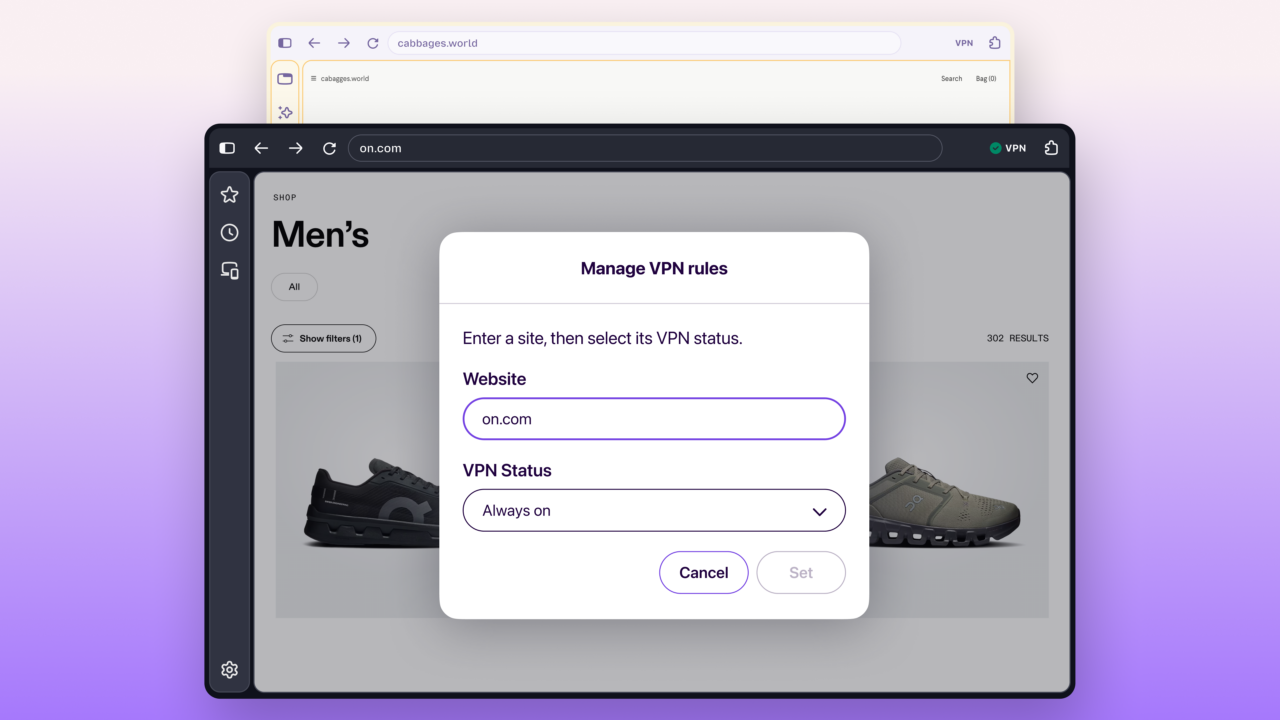
Mozilla released Firefox 161 on Tuesday with a new setting you can use to choose which pages automatically open with the browser's VPN active. Using the "Manage VPN rules" option in Firefox's VPN panel, you can set it to "always on" or "always off" for specific sites, so you don't have to toggle it manually every time you visit certain pages.

Starting Tuesday, Mozilla is also rolling out a "Fire" button in standard Firefox windows that lets you quickly clear your browsing data directly from the toolbar. You can choose which data it deletes, including browsing history, downloads history, cookie data, site data, temporary files, saved form in …


Source link

Disclaimer

We strive to uphold the highest ethical standards in all of our reporting and coverage. We TheMorningPulse.fyi want to be transparent with our readers about any potential conflicts of interest that may arise in our work. It's possible that some of the investors we feature may have connections to other businesses, including competitors or companies we write about. However, we want to assure our readers that this will not have any impact on the integrity or impartiality of our reporting. We are committed to delivering accurate, unbiased news and information to our audience, and we will continue to uphold our ethics and principles in all of our work. Thank you for your trust and support.