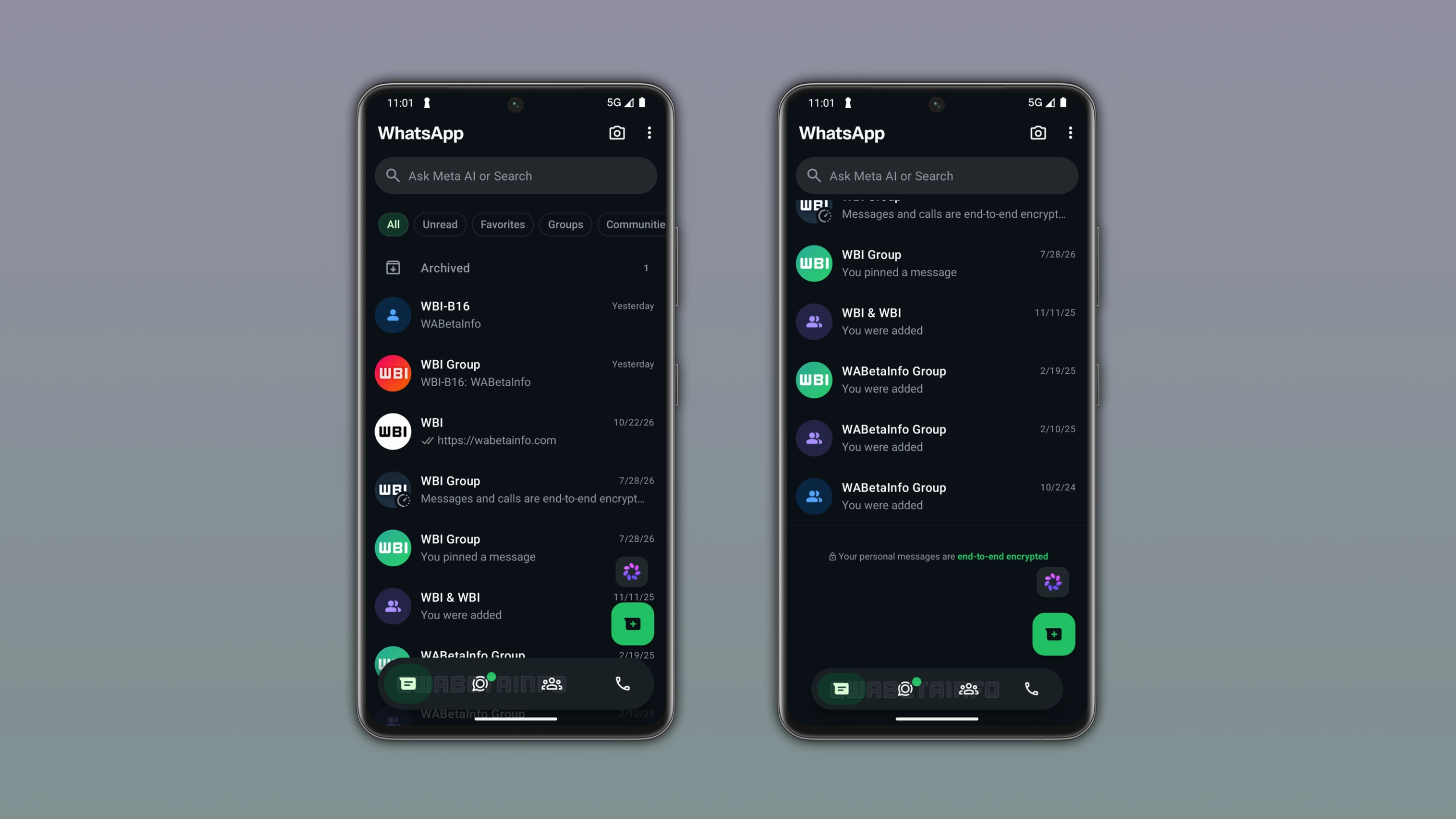
WhatsApp keeps working on the bottom navigation bar for Android, and the latest change is about how it responds to scrolling. WhatsApp will shrink it when users scroll down and bring it back to full size when they scroll up. This will make the design feel more dynamic and less intrusive.
Enter your email address to subscribe to this blog and receive notifications of new posts by email.
This new weekly roundup brings together all the latest updates about WhatsApp beta shared this week. As a result, you can finally catch up on everything you might have missed from our past announcements. You can consider this summary as a way to keep up new features, improvements, and fixes. This week's highlight focuses on an adaptive bottom navigation bar for the Android app. See what else we announced this week.
WhatsApp is bringing scheduled messages to the iOS app. Users can schedule a message by tapping and holding the send button. This action presents the schedule message screen, where users can choose the date and time. The minimum scheduling time is 10 minutes from the current time, and the maximum is two weeks in advance. Once users schedule a message, it appears in a dedicated scheduled messages section within the chat info screen. In this section, users can manage and delete their scheduled messages at any time before WhatsApp sends them.
WhatsApp is testing a new bottom navigation bar that changes its size depending on the direction of the scroll. When users scroll down through their chat list, the bar will shrink into a compact floating pill.
Source link