The new features will enable creators to change the playback speed of their videos and ensure better audio experiences.
Meta announced its latest feature updates for the Edits video editing app, including speed curves for variable playback speed, audio auto-adjust and text animation duration controls.
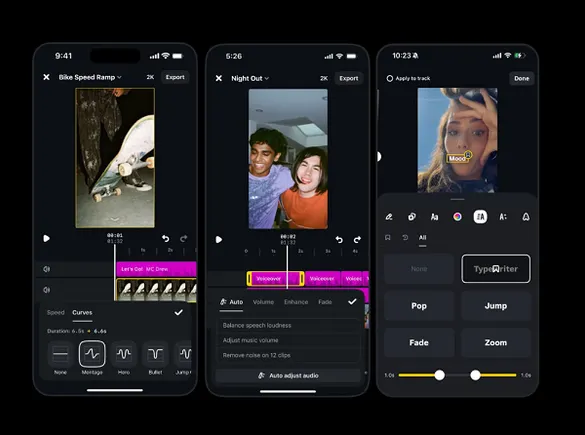
First, Edits users can now implement speed curves in their clips, which implements controlled playback speeds for more impact at certain points.
As shown in the first image above, creators now have a range of speed curve options to choose from, which will increase and/or decrease the video playback speed during a clip.
The second screenshot above shows the updated audio balancing tools, which will enable creators to automatically balance audio levels across video elements.
Edits also wants to show creators more relevant content matches in its Inspiration tab, so users can now choose what topics they want to see more or less of in this element.
The feature is somewhat similar to Meta’s Your Algorithm tool, which enables users to highlight the topics they’re interested or not interested in, in order to refine their news feed.
This is more specifically focused on the clips users are shown on Edits as inspiration for their own content, but it provides a similar manual management capacity.
The second image above also shows new text animation duration controls, which will enable creators to define how long the text in their video is active for. That will give creators the capacity to dictate how fast text appears and disappears, and how fast the animation loops, among other considerations.
Source link