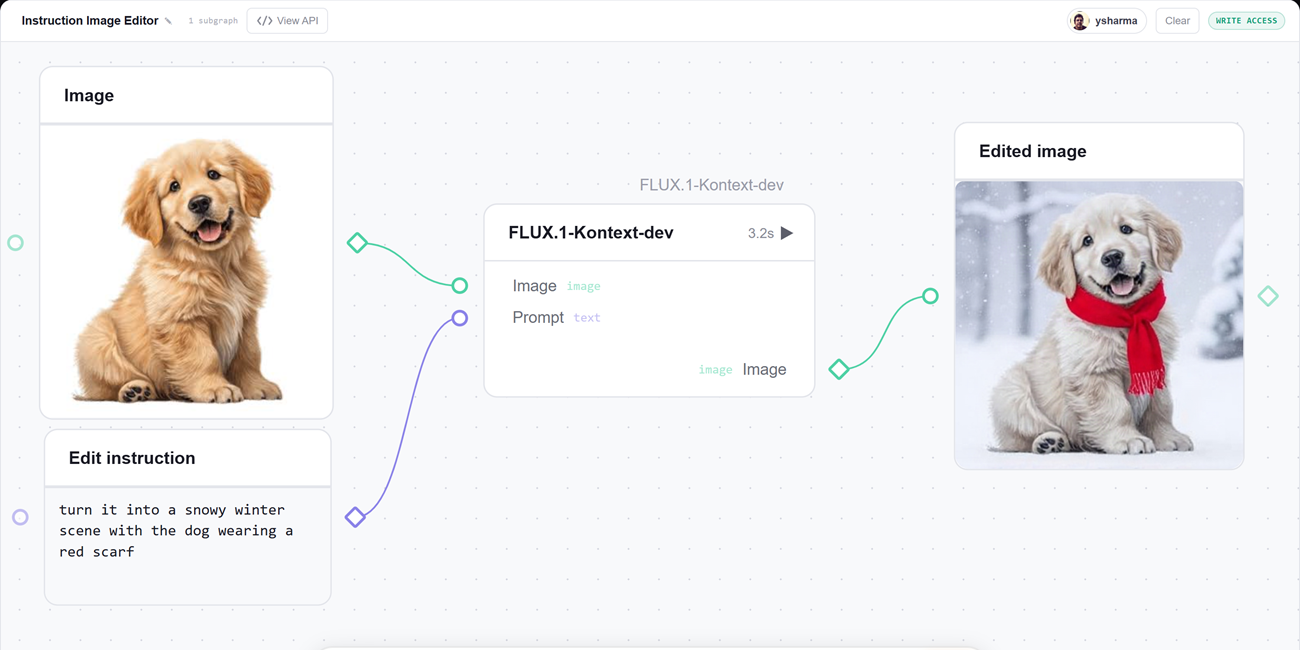
gr.Workflow, built right into Gradio, makes the pipeline the interface. You describe your steps as a graph of typed nodes, and Gradio serves a drag-and-drop canvas where every node is runnable and every intermediate result is visible. The same graph is also a REST API and a one-command deploy to Hugging Face Spaces.
The best way to get the idea is to see a few workflows in action. Every app below is a live Huggingface Space you can open, run, and duplicate.
Upload an image, type an edit ("turn it into a snowy winter scene", "add sunglasses", "make the car red"), and get the edited photo back. The whole app is a single node calling Qwen-Image-Edit on Hugging Face Inference Providers.
One graph, three pipelines. Start with a prompt and generate an image with FLUX, then pass it to a background-removal Gradio Space to turn it into a sticker. A topic becomes a voiceover through a text-to-speech Gradio Space, while the same topic becomes a catchy episode title through an LLM call.
That’s one canvas, two model calls through Hugging Face Inference Providers, and two calls to Gradio Spaces.
Since this is a workflow, each of the three outputs also gets its own REST endpoint: /sticker, /voiceover, and /episode_title. You can call any of them directly from code without opening the UI. See Call it from code below for a runnable example.
Type in one idea, and it turns into a set of generated artwork all at once: a base image from FLUX, two AI re-imaginings of that image (a soft watercolor version and a neon cyberpunk take), and a gallery title written by an LLM.
Source link